
Last updated:
The calendar
Open Online shop › Bookings.
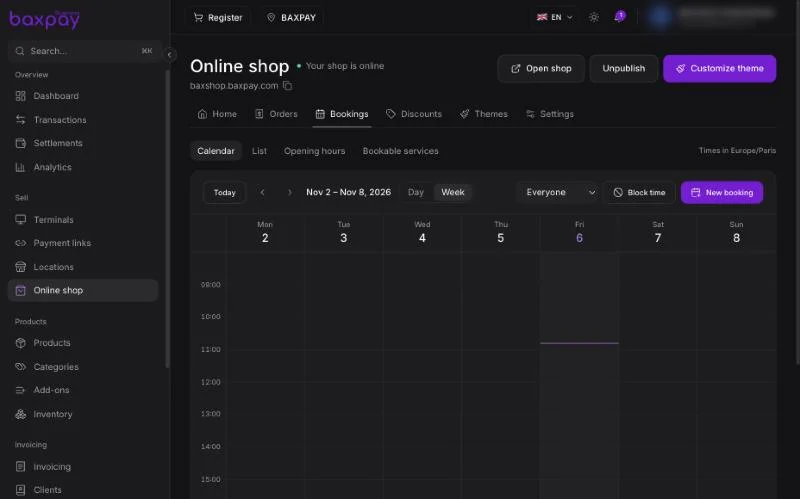
- Switch between Day and Week, and move with the arrows or Today.
- Show Everyone or one team member's calendar.
- Times follow your shop's time zone, shown at the top right.
Add a booking yourself
Select New booking, or double-click an empty time in the calendar. Pick the service, the time and the customer. A booking you add yourself is confirmed straight away and the customer pays on site.
Block time
Use Block time for holidays, a lunch break or personal time, so customers cannot book it. The same button adds extra opening hours. Bookings already made are kept.
The List view shows the same bookings as a list, easier to search.
Set it up
| Tab | What to do |
|---|---|
| Opening hours | The days and hours customers can book |
| Bookable services | The services customers can book online |
A bookable service is a product. In Products, open it, make it bookable and sell it online, then set:
- Duration, and how often a slot can start
- Buffer time before and after
- Minimum notice before a booking
- Online payment — the full price, or a deposit as a percentage with the rest paid on site
Customers pick a free time on your shop and pay online. Their slot is held while they pay; if the payment is not completed in time, the slot goes back on sale.
If you connect Google Calendar, its busy times block your slots too. Only the owner or an admin can connect it.
Before you start
- Your Online shop is published.
- The team members who take appointments are in Team.
Back to README