
Last updated:
To review
Open Invoicing › Books. The first tab, To review, lists the spending that still needs a category or a receipt.
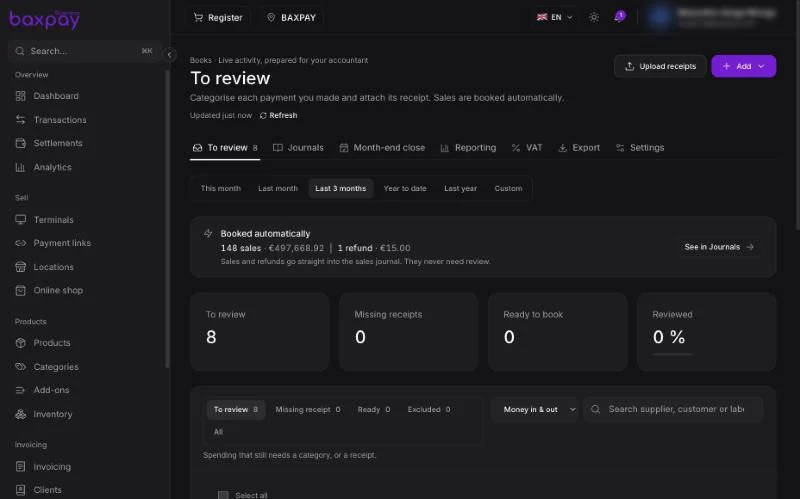
At the top, Booked automatically shows the sales and refunds of the period. They go straight into the sales journal and never need review.
For each payment out:
- Pick a category — for example Goods for resale, Rent or Software & subscriptions. Each category maps to an account number in the French chart of accounts.
- Attach the receipt: drop it on the row or use Upload receipts for several at once.
- Mark it as reviewed.
The counters show what is to review, which receipts are missing, what is ready to book and the share already reviewed.
Choose the period with This month, Last month, Last 3 months, Year to date, Last year or Custom, and filter by money in, money out or both.
The other tabs
| Tab | What it is for |
|---|---|
| Journals | Every booked entry, by journal |
| Month-end close | Close each month in two steps, see below |
| Reporting | Your figures for the period |
| VAT | VAT collected and VAT to deduct |
| Export | Files for your accountant, including the French FEC |
| Settings | How Books categorises and books your activity |
Use Add to record an entry that did not go through BaxPay, like a cash expense.
Closing a month
Once a month is over, Month-end close walks you through it:
- Review — categorise every payment and attach its receipts.
- Close for review — pauses changes while your accountant checks. You can reopen it; the reason is recorded for your accountant.
- Lock — numbers the entries and freezes the month for good. Lock earlier months first.
Test mode
Books follows the Test mode switch in the profile menu. Practise in test mode without touching your real books.
Next: Recipients →